
Why Is Email Marketing Automation Important for Small Businesses?
Are you looking for a way to save time, build stronger customer relationships, and increase sales without constantly sending emails manually? Email marketing automation can help your small business achieve these goals by sending timely, personalized emails based on customer actions, preferences, and behavior.
For small businesses, managing marketing activities with limited time and resources can be challenging. Email marketing automation simplifies this process by allowing you to schedule campaigns, welcome new subscribers, follow up with potential customers, and engage existing customers automatically.
Whether you run an online store, a service-based business, or a local company, email marketing automation can make your marketing efforts more efficient and consistent. In this step-by-step guide, you will learn how email marketing automation works, how to set it up, which campaigns to create, and how to measure your results.
What Is Email Marketing Automation?
Email marketing automation is the process of using software to send emails automatically when specific conditions or customer actions occur. Instead of manually writing and sending every message, businesses create automated workflows that deliver relevant emails at the right time.
For example, when someone subscribes to your newsletter, they can automatically receive a welcome email. If a customer purchases a product, they can receive an order confirmation and follow-up messages.
Common examples of email marketing automation include:
- Welcome emails: Introduce your business to new subscribers.
- Lead nurturing emails: Share useful information with potential customers.
- Abandoned cart emails: Remind shoppers about items left in their online shopping carts.
- Post-purchase emails: Thank customers and provide helpful product information.
- Re-engagement emails: Encourage inactive subscribers to interact with your business again.
By automating these communications, small businesses can maintain regular contact with customers while spending less time on repetitive marketing tasks.
Why Should Small Businesses Use Email Marketing Automation?
Why is email marketing automation valuable for small businesses? The main reason is that it helps businesses communicate more effectively without requiring constant manual effort.
Here are some important benefits.
How Does Email Marketing Automation Save Time?
Writing and sending individual emails can take hours, especially when your subscriber list grows. Automation allows you to create an email sequence once and send it automatically whenever someone meets your chosen conditions.
This frees up time for other important activities, such as customer service, product development, and business growth.
Can Email Marketing Automation Improve Customer Engagement?
Yes. Automated emails can reach customers when the information is most relevant to them. A welcome email immediately after subscription, for example, can introduce your business while the subscriber is still interested.
Personalized messages based on customer preferences and past interactions can also make your communication more useful.
Can Email Marketing Automation Help Increase Sales?
Email automation can support sales by nurturing leads, reminding customers about products, recommending relevant items, and encouraging repeat purchases.
However, results depend on factors such as email quality, audience relevance, deliverability, and the value of your offer. Automation helps deliver your message efficiently, but it does not guarantee conversions.
Which Email Marketing Automation Tool Should You Choose?
Choosing the right platform is an important step in building a successful automation strategy. The best tool depends on your budget, business size, technical experience, and marketing goals.
When comparing email marketing platforms, consider the following features:
- Automation workflows: Can you create welcome sequences, follow-ups, and behavioral campaigns?
- Ease of use: Is the platform simple enough to manage without technical expertise?
- Contact segmentation: Can you organize subscribers by interests, purchases, or engagement?
- Reporting and analytics: Can you track clicks, conversions, and campaign performance?
- Integrations: Does the platform connect with your website, online store, or customer relationship management system?
- Pricing: Will the cost remain manageable as your contact list grows?
Popular platforms to investigate include Mailchimp, Brevo, and MailerLite. Compare their current features, pricing, and plan limitations before choosing one.
For most small businesses, a platform with an easy-to-use workflow builder, reliable reporting, and room to grow is a sensible starting point.
How Do You Define Your Email Marketing Automation Goals?
Before creating your first automated campaign, decide what you want to accomplish. Clear goals help you choose the right emails and measure whether your strategy is working.
Start by identifying your primary objective.
To generate leads: Offer a useful guide, checklist, or newsletter subscription in exchange for permission to send emails.
To increase sales: Create product recommendation emails, purchase follow-ups, or abandoned cart reminders where appropriate.
To improve customer retention: Send helpful tips, product updates, loyalty messages, or relevant offers to existing customers.
To build brand awareness: Introduce your business, explain your expertise, and share useful content with new subscribers.
Choose one primary goal for your first email marketing automation workflow. A focused campaign is easier to build, test, and improve than several complicated workflows running simultaneously.
How Do You Build an Email List for Automation?
Email marketing automation works best when you have an audience that genuinely wants to hear from your business. Building a permission-based email list should therefore be one of your first priorities.
Here are practical ways to attract subscribers.
Create a Valuable Signup Offer
Give potential subscribers a clear reason to join your list. Depending on your business, this could be a discount, educational guide, free checklist, webinar invitation, or useful newsletter.
Make sure the offer matches the interests of your intended audience.
Add Signup Forms to Your Website
Place email signup forms on relevant pages, such as your homepage, blog, resource library, or checkout page. Explain what subscribers will receive and how frequently you expect to email them.
Use Clear Calls to Action
Encourage visitors to subscribe with specific wording, such as “Get Weekly Marketing Tips” or “Receive Our Free Business Checklist.”
Avoid purchasing email lists or adding people without appropriate permission. Follow applicable privacy and email marketing laws, including unsubscribe requirements and consent rules where relevant.
A healthy email list is more valuable than a large list of people who never asked to receive your messages.
How Do You Set Up Email Marketing Automation Step by Step?
Once you have selected a platform and established your goals, you can begin building your first workflow.
Step 1: Choose Your First Automation Workflow
Start with a simple campaign that supports your main objective. For beginners, a welcome email series is often a practical choice because it introduces your business to new subscribers.
Step 2: Select a Trigger
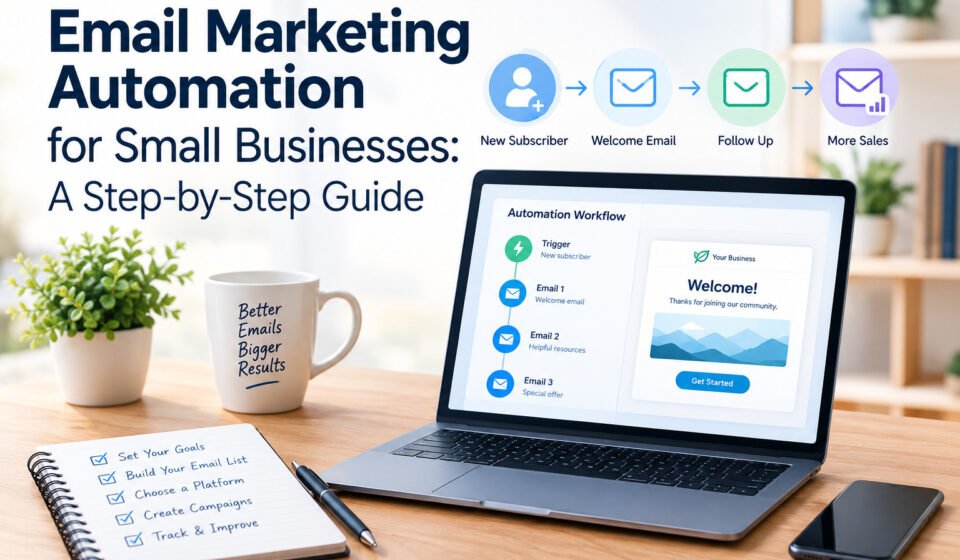
A trigger is the event that starts an automated workflow. Common triggers include subscribing to a newsletter, completing a purchase, downloading a resource, or reaching a particular point in a customer journey.
Choose a trigger that directly relates to the goal of your campaign.
Step 3: Create Your Email Content
Write clear, useful messages that address your audience’s needs. Each email should have one main purpose and a relevant call to action.
For example, a welcome series might introduce your business in the first email, provide a helpful resource in the second, and explain your products or services in the third.
Step 4: Set the Timing
Decide when each email should be delivered. A welcome email might arrive immediately after signup, while subsequent educational emails could be spaced over several days.
The ideal timing depends on your audience and the purpose of the sequence, so test different schedules when appropriate.
Step 5: Personalize Your Messages
Use relevant information, such as a subscriber’s first name, interests, or previous purchases, when it is available and appropriate.
Effective personalization goes beyond inserting a name. It means sending content that matches the recipient’s needs and stage in the customer journey.
Step 6: Test the Workflow
Before activating your email marketing automation campaign, test the signup form, trigger conditions, links, email formatting, timing, and unsubscribe process.
Send test messages to different devices and email clients to check how they appear.
Step 7: Activate and Monitor the Campaign
Once everything works correctly, activate the workflow and monitor its performance. Review engagement, conversions, unsubscribes, and any delivery issues.
Make improvements based on the data rather than assuming that your first version will be the most effective.
Which Automated Email Campaigns Should Small Businesses Create First?
You do not need dozens of workflows to benefit from email marketing automation. Begin with a few campaigns that address important moments in the customer journey.
Welcome Email Series
A welcome series introduces your business to new subscribers and sets expectations for future emails.
A simple three-email sequence could include:
- Email 1: Welcome the subscriber and deliver the promised resource.
- Email 2: Share useful advice or explain how your business can help.
- Email 3: Introduce a relevant product, service, or next step.
Lead Nurturing Emails
Lead nurturing emails educate potential customers who are interested but not yet ready to buy.
For example, a marketing consultant could send subscribers a practical checklist, a case study, and an invitation to schedule a consultation.
Abandoned Cart Emails
Online stores can use abandoned cart emails to remind shoppers about products they left behind. These messages should be timely, relevant, and consistent with the store’s privacy obligations and marketing permissions.
Post-Purchase Emails
After a purchase, customers may appreciate order-related information, setup instructions, care tips, or product recommendations.
Keep transactional messages distinct from promotional content where required by applicable laws.
Re-Engagement Emails
If subscribers stop interacting with your emails, a re-engagement campaign can ask whether they still want to receive updates or offer content that better matches their interests.
Respect unsubscribe requests and remove or suppress contacts who no longer want your messages.
How Can You Personalize Email Marketing Automation?
Personalization helps make automated emails feel relevant rather than generic. Instead of sending the same message to everyone, organize your audience into meaningful groups.
Here are several ways to personalize email marketing automation.
Segment by interests: Send content based on the topics subscribers choose to receive.
Segment by customer status: Distinguish between new subscribers, potential customers, first-time buyers, and repeat customers.
Use purchase history: Recommend complementary products or share helpful instructions related to previous purchases.
Respond to engagement: Adjust your messaging based on meaningful interactions, such as clicks or visits, where your platform supports these signals.
Use dynamic content: Display different recommendations or information within the same email based on relevant subscriber data.
Remember that personalization should be helpful, transparent, and respectful. Collect only the data you need, protect it appropriately, and avoid using sensitive information in ways that could surprise or disadvantage subscribers.
How Do You Measure Email Marketing Automation Performance?
Tracking results helps you understand whether your automated campaigns are achieving their goals.
Instead of focusing on a single metric, evaluate several indicators together.
Metric: What It Tells You About Delivery rate How successfully emails reach recipient mail servers Open rate: The proportion of delivered emails recorded as opened, subject to tracking limitations Click-through rate How often recipients click links in your emails Conversion rate: How often recipients complete a desired action Unsubscribe rate: How often recipients opt out of your email list Revenue per email or campaign The revenue attributed to a campaign under your measurement method
Open rates can be affected by privacy features and automated image loading, so they should not be treated as a perfect measure of engagement.
For a sales-focused campaign, conversions and attributable revenue may be more useful than opens alone. For an educational newsletter, meaningful clicks and subscriber retention may be more relevant.
Review your results regularly and compare campaigns with similar goals. Use what you learn to refine subject lines, content, calls to action, and workflow timing.
What Are the Common Email Marketing Automation Mistakes to Avoid?
Even a well-designed automation strategy can underperform when important details are overlooked.
Sending Too Many Emails
Frequent messages can overwhelm subscribers and increase unsubscribes. Create a reasonable schedule and coordinate overlapping workflows to avoid sending several emails too close together.
Ignoring Mobile Users
Many people read emails on mobile devices. Use responsive templates, readable text, concise copy, and buttons that are easy to tap.
Forgetting to Test Automation Triggers
Incorrect triggers can cause people to receive irrelevant, duplicated, or mistimed messages. Test every workflow before launch and review it after making changes.
Failing to Segment Your Audience
Sending every message to every subscriber can reduce relevance. Use simple, meaningful segments rather than creating unnecessary complexity.
Ignoring Deliverability
Authenticate your sending domain where supported, maintain a permission-based list, remove invalid addresses, and monitor spam complaints and bounce rates.
Treating Automation as a Set-and-Forget Strategy
Automated campaigns still need attention. Review their performance, update outdated information, check links, and adjust messaging as your business changes.
Avoiding these mistakes can help you build a more reliable and effective email marketing automation strategy.
What Is the Best Way to Start Email Marketing Automation on a Small Budget?
You can begin email marketing automation without investing in an expensive marketing system. The key is to focus on essential features and expand gradually.
Start with a free or affordable email marketing plan that supports the workflow you need. Check its subscriber limits, sending limits, branding restrictions, integrations, and automation availability before committing.
Next, create one signup form and one welcome sequence. Write the emails yourself, use a simple template, and track the campaign’s results.
Once the first workflow is working well, introduce additional campaigns based on your business needs. An online store might prioritize abandoned cart reminders, while a service provider might focus on lead nurturing and consultation follow-ups.
Invest in more advanced tools only when they solve a clear problem or provide measurable value.
The most effective email marketing automation strategy is not necessarily the most complicated one. It is the one that consistently delivers useful messages to the right people and supports your business objectives.
Conclusion: How Can You Make Email Marketing Automation Work for Your Business?
Email Marketing Automation gives small businesses a practical way to communicate with customers, nurture leads, and support sales without manually managing every email.
By defining clear goals, choosing an appropriate platform, building a permission-based subscriber list, and creating useful automated workflows, you can establish a strong foundation for long-term email marketing success.
Start with one simple campaign, test it carefully, and monitor the results. As you learn more about your audience, improve your messaging and introduce additional workflows where they provide genuine value.
With a thoughtful strategy and regular optimization, email marketing automation can become a valuable part of your small business marketing plan.
Frequently Asked Questions (FAQs)
1. What is email marketing automation in simple terms?
Email marketing automation is the use of software to send emails automatically based on specific triggers, schedules, or customer actions. It helps businesses deliver timely and relevant messages without sending each email manually.
2. Is email marketing automation suitable for small businesses?
Yes. Email marketing automation can help small businesses save time, maintain consistent communication, nurture leads, and engage existing customers. Many platforms offer entry-level plans that make it possible to start with a small budget.
3. How much does email marketing automation cost?
The cost depends on the platform, number of subscribers, email volume, and features required. Some services offer free plans with limitations, while advanced automation features may require a paid subscription. Always compare current pricing and plan restrictions.
4. Which email marketing automation tool is best for beginners?
The best tool depends on your needs, budget, and technical experience. Compare platforms such as Mailchimp, Brevo, and MailerLite for ease of use, automation features, integrations, reporting, and pricing before making a decision.
5. What is the first email automation a small business should create?
A welcome email series is often a good starting point. It introduces your business, delivers the content promised during signup, and guides new subscribers toward a relevant next step.
6. How many emails should an automated sequence contain?
There is no universal number. A short sequence of two or three emails may be sufficient for a simple welcome campaign, while more complex customer journeys may require additional messages. Prioritize usefulness and relevance over email quantity.
7. Does Email Marketing Automation increase sales?
It can help increase sales by nurturing leads, recommending relevant products, and encouraging repeat purchases. Results depend on the audience, offer, content, timing, and overall customer experience.
8. Is email marketing automation difficult to set up?
Most modern platforms offer visual workflow builders and pre-designed templates that simplify setup. Beginners can start with a basic trigger, a short email sequence, and a simple schedule before moving to more advanced workflows.
9. How can I improve my email marketing automation results?
Improve results by segmenting your audience, writing useful content, testing subject lines and calls to action, monitoring conversions, maintaining list quality, and regularly reviewing your workflows.
10. Is email marketing automation legal?
Email marketing automation can be used legally when businesses follow applicable email marketing, privacy, and data protection requirements. Depending on your audience and location, this may include obtaining appropriate consent, identifying the sender, providing a working unsubscribe method, and honoring opt-out requests.
11. Can I use email marketing automation without a website?
Yes. Some platforms let you collect subscribers through hosted signup pages, social media campaigns, events, or other permission-based channels. However, a website can make it easier to publish useful content, explain your offers, and grow your subscriber list.
12. How often should I review my automated email campaigns?
Review performance regularly, such as monthly, and after significant changes to your offers, audience, or workflow. Check engagement, conversions, unsubscribes, deliverability, and outdated content to keep your email marketing automation campaigns effective.
Visit Home